


What you need to know
Start with the ringing phone and front gate, learn the basic wash loop, then slow down when later visits add dialogue and scene-specific care. Read the current objective, finish the task in front of you and note any response you may want to change on another run.
LIGHT STORY SPOILERS The opening steps are practical instructions. Later route details stay cautious where the game does not show a clear cause and effect.
Your job at the wash station
You run a soap-and-wash service built for dragons. What begins as hands-on cleaning gradually becomes conversation, care and more personal requests as the customers return. The game lists three endings and estimates approximately 90 minutes of content for each ending.
Alexander, Ryan and Conrad all appear in one shared run. You can pay closer attention to one relationship, but you are not choosing three isolated campaigns from the title screen.
Before starting a run
- Update the game before using an old workaround; the September 2026 hotfix changed several interactions.
- Choose a progress slot, but do not assume it is a manual save at every dialogue choice.
- Use the current on-screen prompt for exact input buttons.
- Keep short notes if you want to compare relationship choices on another run.
Tools you will use
| Tool or item | Role | Switch when |
|---|---|---|
| Bucket and water | Prepare and refresh the wet cleaning loop | The sponge stops registering |
| Sponge | Remove visible dirt in broad passes | The surface is clean or the request changes |
| Sprayer | Rinse soap and loosened grime | Soap clears or the objective advances |
| Hands and later items | Contextual interactions named or exposed by the scene | The current prompt requests something else |
The official hotfix also names a medkit and a mount in later scenes, but it does not publish universal unlock thresholds. Follow the current request rather than a fan-made tool score.
Open the complete tool reference →Drag'n Wash Story Walkthrough, Step by Step

Answer the phone and open the wash bay
Go downstairs, answer the ringing phone, finish the window conversation and use the gate control when the objective sends you there.
- Ready
- The waiting dragon enters and moves into the station.
- If stuck
- Put away a held item, finish every dialogue prompt and approach the highlighted control before restarting.
Prepare water and wet the sponge
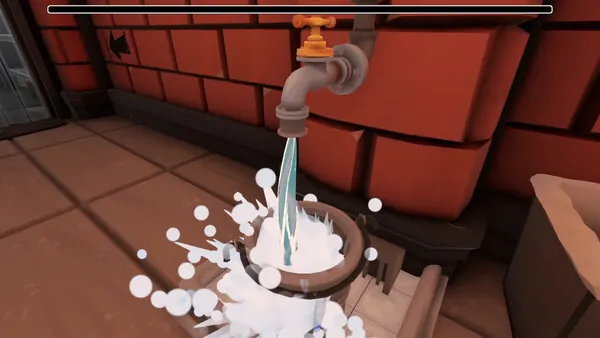
Fill the bucket, wet the sponge and move to a visibly dirty area. Re-wet the sponge when scrubbing stops changing the surface.
- Ready
- Dirt begins to fade and the wash indicator responds.
- If stuck
- Check that the current objective still asks for washing and that the sponge is wet.

Scrub, reposition and rinse
Work across broad dirty areas, use the available interaction to expose the far side, then rinse soap and loosened grime from every cleaned surface.
- Ready
- Soap clears and a new conversation, request or dismissal prompt appears.
- If stuck
- Change camera angle and inspect the far side, limbs, tail and neck edges before repeating one motion.

Read each later visit before collecting tools
Later arrivals can begin with debris, first aid, dialogue or scene equipment. Read the active request first instead of assuming every visit starts with soap.
- Ready
- The requested item or interaction changes the objective and moves the visit forward.
- If stuck
- Put down the wash tool and look for the named item, dialogue target or interaction prompt.
Track Conrad's first relationship fork
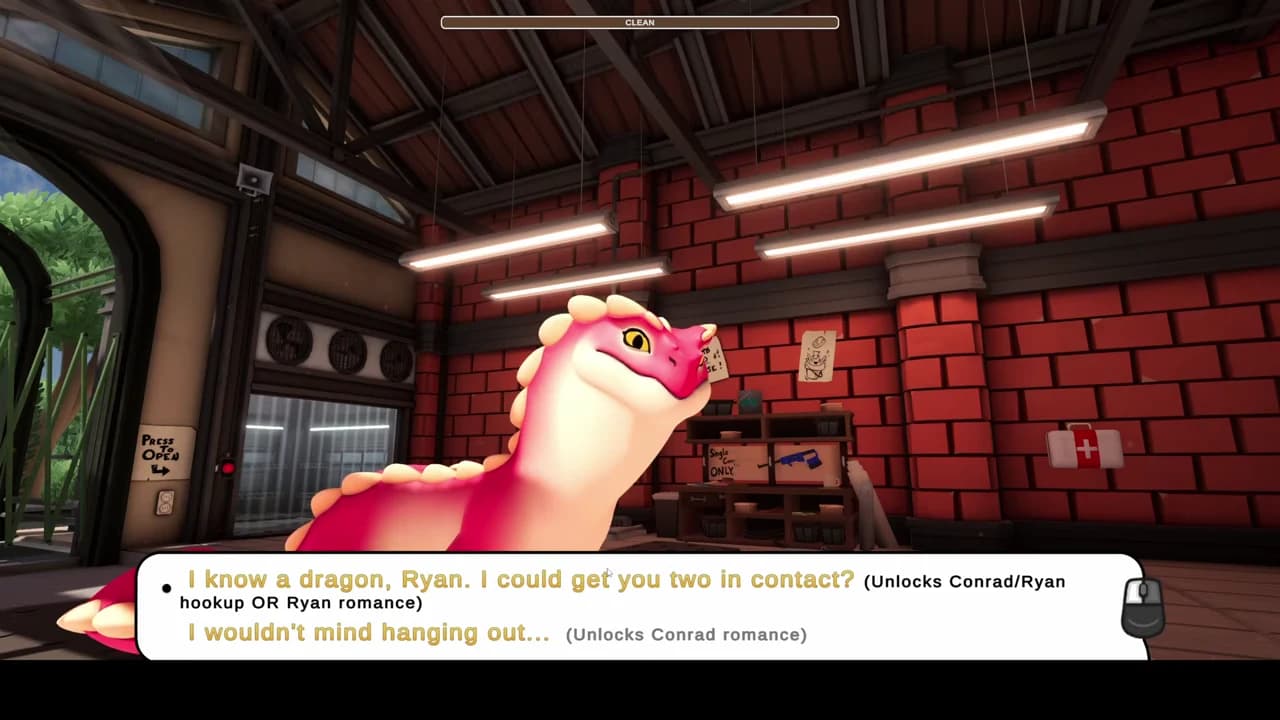
When Conrad asks who he should spend time with, decide whether to open his romance or introduce him to Ryan. This is the first recorded route decision.
- Ready
- The menu displays a romance unlock or keeps the Ryan connection available for the picnic.
- If stuck
- Do not interpret earlier friendly replies as this lock; compare the full on-screen menu.
Settle Ryan's route at the picnic
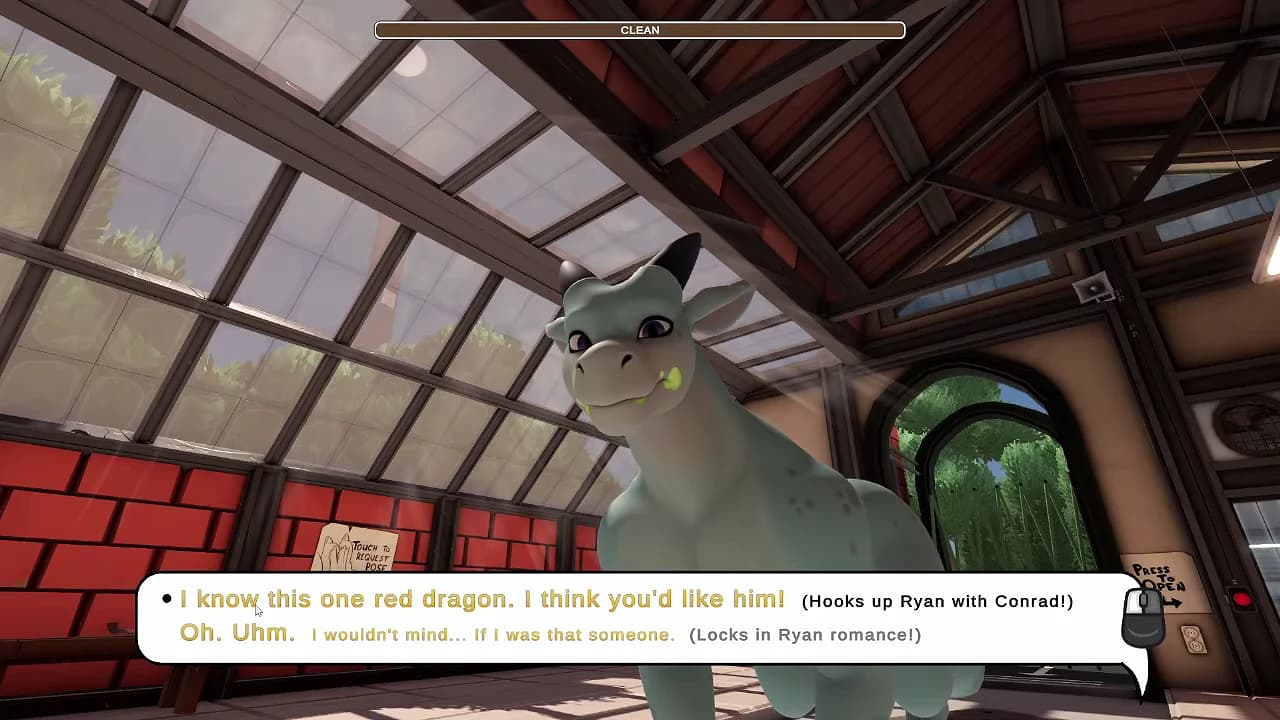
At the picnic, volunteer yourself to date Ryan or recommend the red dragon to complete the Ryan–Conrad pairing.
- Ready
- The game labels either Ryan romance or the Ryan–Conrad hookup on screen.
- If stuck
- Earlier picnic replies change the conversation but do not replace this recorded route lock.
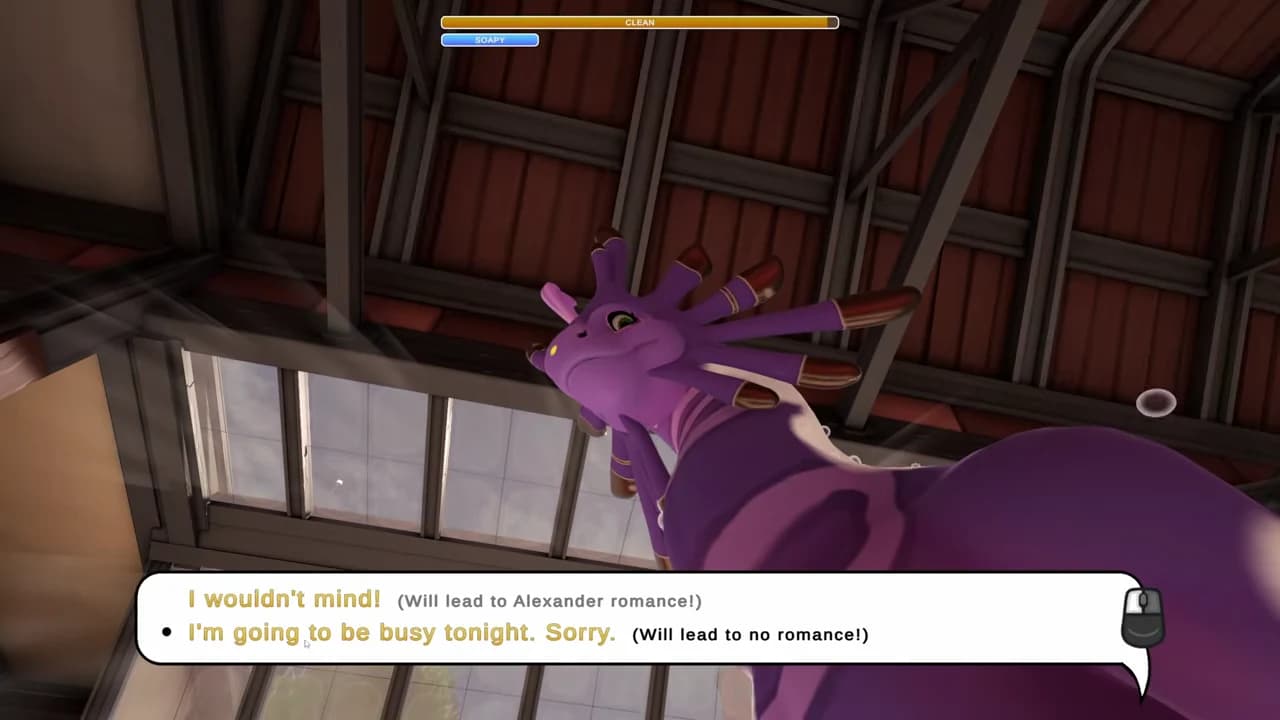
Reach Alexander's late invitation
If the player remains unattached, Alexander's late conversation presents a clearly labelled romance or no-romance decision.
- Ready
- The menu states which relationship state the answer will create.
- If stuck
- If Alexander discusses an existing date instead, review the relationship already locked earlier in the run.

Finish the credits and plan one controlled replay
Complete the locked relationship scenes and credits, then write down the route you saw before beginning another run.
- Ready
- You can compare the completed outcome with a second run that changes one confirmed lock.
- If stuck
- Do not treat Continue as a chapter selector or scene gallery; preserve the completed slot and use another run for comparison.
The first three stages are the repeatable care loop. Later stages summarize only recorded route decisions; ordinary dialogue variations remain on the character and endings pages instead of being promoted to fake branches here.
The wash loop in one glance
The clean indicator and the scene objective are related but not identical. A full-looking bar can still leave a small mark, soap layer or separate interaction. Stop repeating one motion and diagnose which state you are in.
What changes after the first wash
Later visits build on the same basic rhythm but can add debris removal, care items, different dialogue and interactions that are not ordinary washing. A useful walkthrough habit is to separate the mechanical state from the story state:
- Customer arrivalFinish the window, gate or conversation state.
- PreparationIdentify the requested care task before collecting tools.
- Wash or special taskUse visual and prompt feedback; later visits do not all begin with soap.
- Conversation and relationship choiceRecord a meaningful response if you want to compare a replay.
- Dismissal or next objectiveWait for the scene to close before assuming progress is stuck.
Player videos show leaves, first aid, a late-night visit, a picnic and later contextual equipment. They are useful clues for finding a scene, but exact order and route effects may still change with the current build.
Compare dragon visits and story moments →The three dragons in the shared run
Conrad is named directly in official patch notes. Alexander and Ryan are the names shown in recorded game menus and used in player route records; the current store description does not identify all three by name. Their pages keep that distinction visible.
Relationship choices and route discipline
The safest way to learn route structure is to change one meaningful response between runs. Do not alter every conversation, cleaning technique and request at once and then attribute the outcome to one guessed affection value.
| Record | Why | Do not assume |
|---|---|---|
| Character and scene | Locates the branch in the shared run | That every visit is route-exclusive |
| Exact response | Makes a replay comparable | That wording maps to a numeric score |
| Later dialogue change | Shows an observable consequence | That it alone caused the ending |
| Final outcome | Connects the test to a result | That fan-made ending names are official |
How long a full Drag'n Wash playthrough takes
The developer describes approximately 90 minutes of content per ending. Treat that as a content estimate rather than a timer: reading every line, inspecting the station or recovering a stuck wash can make a first run longer, while a focused replay may be shorter.
The released experience is a compact story playthrough. Job Mode, endless washing and a chapter gallery appear in player requests and fan pages, but they are not treated here as shipped features. Check the development timeline before planning around them.
Approaching an ending
The developer confirms three endings, while filmed choices now establish route locks for Conrad and Ryan. Before the late part of a run, record which relationship you opened and how Alexander responds. Complete the run before testing a different variable.
If Continue returns to credits, do not assume the completed slot is a gallery or chapter selector. Preserve your notes and start another slot or run for the next comparison.
When the wash will not complete
- Read the active request.
- Confirm the sponge is wet and the rinse pass removed soap.
- Inspect the far side, tail, neck edges and limbs from a new angle.
- Put down the tool and look for dialogue, debris or another interaction.
- Use Unstick Kobold only if movement or interaction is actually locked.
- Restart the scene only after the safer checks fail.
Common walkthrough pitfalls
| Symptom | Likely category | Next page |
|---|---|---|
| Clean bar appears full | Missed spot, rinse or waiting request | Wash-progress decision tree → |
| Cannot move or interact | Possible softlock | Recovery steps → |
| Long first boot | Shader preloading or launch issue | Launch checks → |
| Cannot find Job Mode or gallery | Possibly an unshipped feature request | Development status → |
Before following an exact route claim
The opening sequence can be repeated consistently, but the game does not publish numeric romance thresholds or a complete ending-route chart. Treat any guide that promises an exact hidden score with caution.
Patch changes can also alter a scene or workaround. If a step behaves differently, update the game first and check the latest changes before restarting your run.